
 By Camille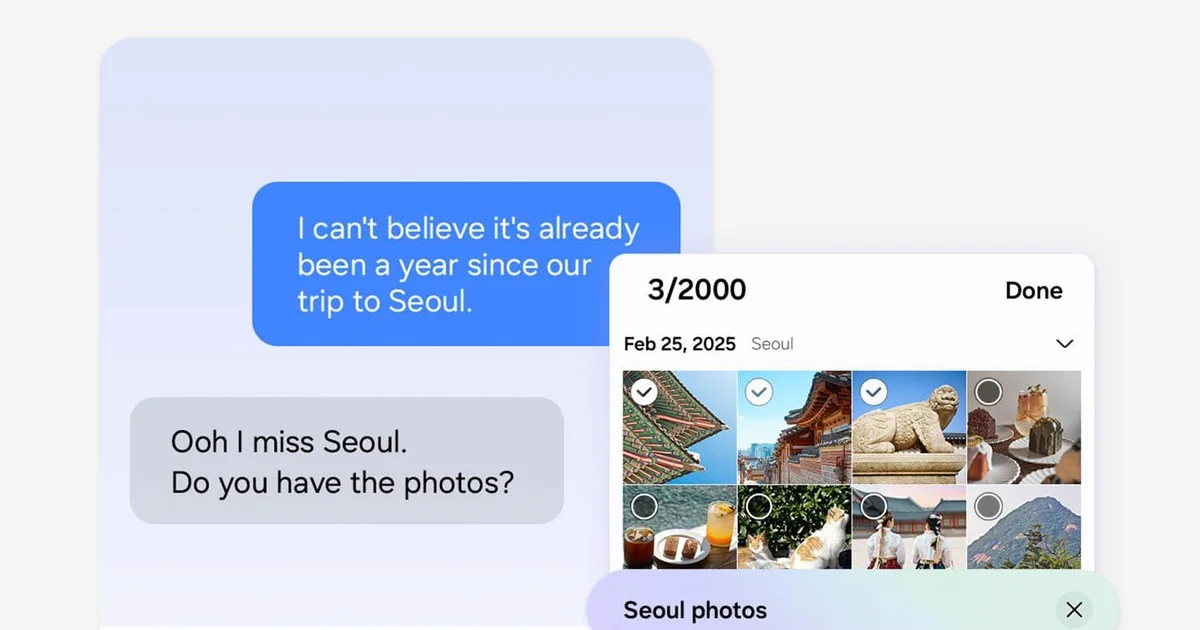
Samsung began the official One UI 9 rollout for the Galaxy S26, S26+ and S26 Ultra on September 16.
The software had already debuted on the Galaxy Z Fold8 Ultra, Fold8 and Flip8. Samsung says additional Galaxy devices will follow progressively, with timing varying by market, carrier and model.
One UI 9 is based on Android 17, but the more interesting change is how deeply Samsung is spreading Galaxy AI into ordinary phone functions including messaging, Gallery, security, translation, scanning and device support.
Now Nudge tries to understand what you are likely to do next
Now Nudge is probably the clearest expression of Samsung's direction.
The system can use available context inside supported apps to surface an action it considers immediately relevant.
If people are discussing plans in a conversation, the phone may suggest adding an event to Calendar. A shared location can be saved without leaving the conversation, while a request for trip photos can bring up images the system believes match that context.
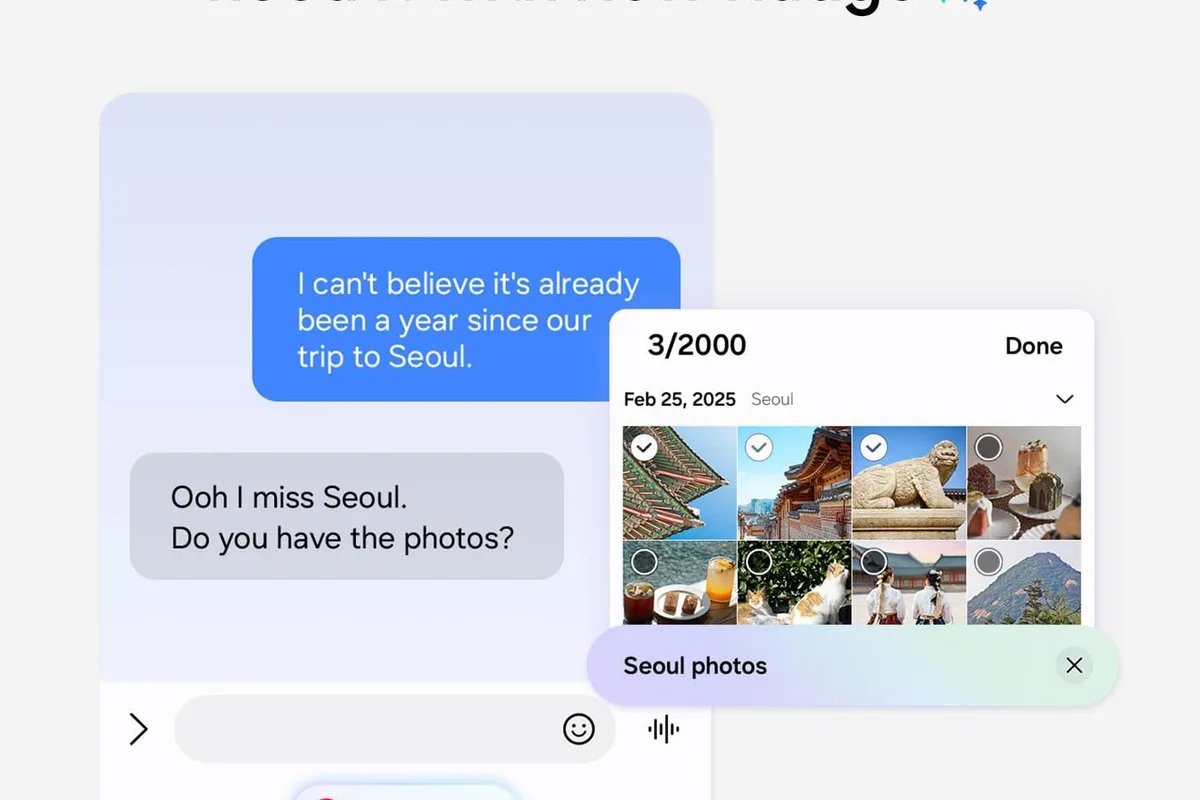
Samsung says messaging prompts can work with supported services including Samsung Messages, Google Messages and Google Chat.
Photo-sharing suggestions may analyze available image content, and Samsung explicitly warns that generated recommendations are not guaranteed to be accurate.
That distinction matters. Now Nudge is not supposed to become an autonomous decision maker. It inserts a prediction layer between the user's current context and a possible next action.
The assistant is becoming a proactive interface
That may sound like a small distinction, but it changes where AI sits in the operating system.
A conventional assistant usually waits for a question. A proactive interface has to decide that something currently happening deserves a suggestion.
It therefore has to identify useful signals without turning every conversation, photo and notification into another reason to put a button on the screen.
One UI 9 will be judged as much by that restraint as by the intelligence of the model itself.
A correct but unnecessary suggestion is still an interruption.
Now Brief is becoming much more configurable
Samsung is also expanding Now Brief, its personalized daily-summary system.
One UI 9 adds generative and editable cards, allowing users to exercise more control over what appears and build cards around areas such as health, weather and video.
Samsung says personalized briefing content is based only on personal information for which the user has provided consent.
The feature requires a Samsung Account, and some capabilities may also require a network connection.
The goal is to make Now Brief behave more like a contextual dashboard rather than a fixed feed that looks the same for everyone.
My FanCam uses AI after recording rather than during it
My FanCam, introduced with Samsung's latest foldables, is part of the broader One UI 9 experience on compatible devices.
A user can select a person inside an already recorded video. The software then tracks that subject and intelligently reframes the footage to keep them near the center.
Samsung positions the feature for performances, sporting events and other scenes where a person moves around within a wider shot.
The advantage is that framing can happen after capture. The user can record more broadly and produce a focused version afterward instead of perfectly following the subject while filming.
Samsung notes that the feature depends on having a suitable trackable subject and that accuracy is not guaranteed.
Creative Studio is beginning to suggest its own moments to generate something
One UI 9 also makes Creative Studio more proactive.
The software can surface image-generation ideas around relevant upcoming events.
Samsung gives the example of an approaching birthday prompting a suggestion to create a themed image or greeting.
The shift resembles Now Nudge: the user no longer always has to decide first that they want to open a generative tool.
The operating system is trying to identify moments when that tool might become useful.
Interpreter now keeps more conversational history visible
Interpreter gains a new Thread View.
Instead of treating each translated statement almost in isolation, users can refer back to earlier exchanges more easily and follow the structure of the conversation.
Samsung also promises faster translation in Conversation Mode and quicker playback through compatible Galaxy Buds.
In real-time interpretation, repeatedly waiting several seconds after every sentence can damage the flow of a conversation. Reducing that latency can matter more than another language on a specification sheet.
Security is moving into Now Brief too
One of the more interesting additions is Security Brief.
One UI 9 can surface security and privacy information through Now Brief, including warnings around malware, apps from unknown sources and permissions the system considers unnecessary.
Security becomes proactive in the same way as the productivity features.
Instead of requiring users to open a specialized settings page, Samsung can place a warning somewhere they are more likely to check routinely.
Privacy Alerts uses on-device AI to watch certain app behaviors
Privacy Alerts takes that approach further.
Samsung says on-device AI can identify potential privacy risks, including background attempts to access permissions that may be unnecessary.
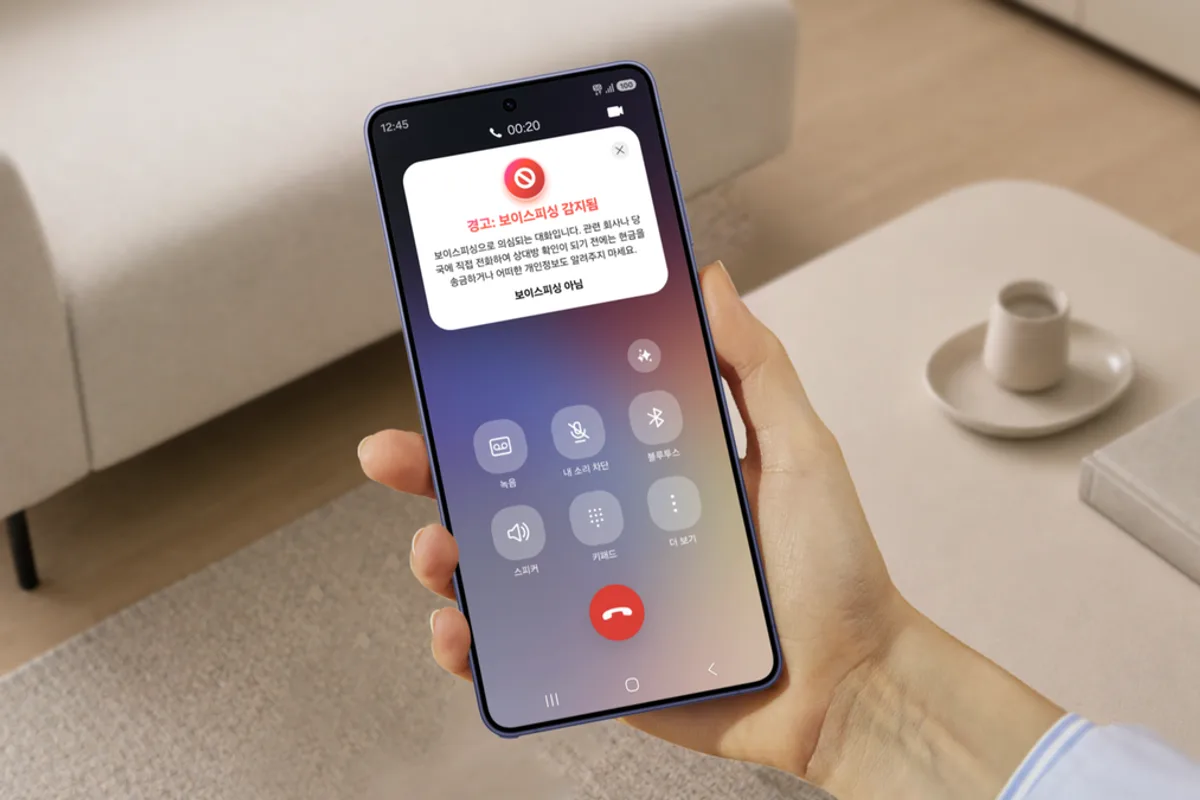
The word “potential” is important.
An app accessing a permission in the background is not automatically malicious. Navigation software may legitimately need location, just as a health app may need sensor access while it is not on screen.
The system is therefore trying to identify behavior worth reviewing rather than independently declaring that an application is spying on the user.
Samsung also warns that Privacy Alerts may not account for every relevant factor.
Keeping privacy analysis on the device changes the tradeoff
Local processing makes particular sense for this kind of feature.
A privacy system would lose some of its value if it routinely had to send the same sensitive permission and usage information to a remote server for analysis.
On-device processing reduces that exposure and can also allow some checks to operate without relying on a cloud service.
It does not make the system infallible. A local model can still produce false positives or miss genuinely suspicious behavior.
Its value comes from adding another heuristic layer to Android's existing permission controls.
Scam Detection is expanding again
One UI 9 also expands Samsung's Scam Detection availability.
Samsung says support is extending to Japan, Canada and India, while availability still depends on market, language, device model and software version.
The feature is intended to identify interactions that may resemble scam calls or fraud attempts and warn the user before sensitive information or money changes hands.
As with all systems of this kind, usefulness depends heavily on false-positive rates. A protection layer that warns about too many ordinary calls is quickly trained to be ignored.
Document Scan is going after the pages phone scanners usually hate
Some of the less spectacular changes may prove more useful in daily life.
Samsung is improving Document Scan to better handle curved book pages and documents with folded corners.
An improved Finger Eraser can also clean up scans when a hand holding the paper appears in the image.
Compatible large-screen Galaxy devices receive layouts intended to make document manipulation easier.
This is another side of mobile AI: solving a very specific imaging problem to remove a manual correction step without asking the user to talk to a chatbot.
Voice Recorder is trying to produce a document rather than only a transcript
Voice Recorder also changes how its summaries are displayed.
One UI 9 can structure certain summaries using headings and tables so key information is easier to scan.
That moves the feature beyond simple automatic transcription.
The phone is attempting to reconstruct a useful information structure from what was recorded.
That can be valuable for meetings and interviews, provided users can still refer back to the original recording or transcript when accuracy matters.
Samsung is even putting warranty and repair tools directly into Settings
One UI 9 introduces a Warranty and Care menu.
Depending on the market and device, users can check warranty coverage for products associated with their Samsung Account, run self-diagnostics, view repair estimates, manage Samsung Care+ and book service appointments.
It is not a glamorous AI feature, but it may become one of the most practical additions when something actually goes wrong.
The integration shortens the distance between software diagnostics and the hardware support that may need to follow.
The biggest One UI 9 change is not another standalone AI app
Samsung is not merely adding one more Galaxy AI button.
Now Nudge appears inside messaging workflows. Privacy Alerts sits beside permission management. Security Brief feeds into the daily summary. My FanCam operates inside Gallery. Interpreter preserves more context, while Creative Studio begins deciding when generation might be useful.
AI is gradually disappearing as a separate destination and becoming a diffuse property of the operating system.
That is more convenient when the suggestions are good.
It is also more demanding for Samsung. An AI feature the user deliberately opens can afford to be wrong occasionally. An AI feature that intervenes on its own during ordinary phone use needs to become very good at knowing when to stay quiet.
The rollout is still gradual
The Galaxy S26 family is the first expansion wave after the Fold8 Ultra, Fold8 and Flip8.
Samsung has also offered One UI 9 beta access to several earlier devices, including the Fold7, Flip7 and Galaxy S25 family, indicating which generations are likely to follow.
The company does not promise that every capability will be identical on every model.
Region, language, local processing capability, Samsung Account requirements and network access can all affect what is actually available.
One UI 9 is therefore less a single identical update than a software foundation whose capabilities Samsung distributes across different devices.
And the direction is increasingly clear: the next phase of Galaxy AI is not simply waiting to answer when the user calls it, but trying to understand when the user might have wanted to call it in the first place.