
 By Camille
Not every meaningful Windows update introduces a redesigned desktop or a new AI assistant. Sometimes the improvements concern much more ordinary problems: an audio connection that drops unexpectedly, an incorrect device status or a File Explorer control that does not behave as expected.
Microsoft's latest optional Windows 11 preview focuses heavily on those everyday reliability issues. KB5127653 applies to version 26H1 and updates the operating system to build 28000.3365.
The release is organized into two deployment categories. Normal-rollout fixes are delivered to eligible systems when the update is installed. Features under gradual rollout may take longer to appear on individual devices.
That distinction matters when evaluating the update. Installing it successfully does not necessarily mean every announced interface change will be visible immediately.
File Explorer receives several practical refinements
The File Explorer Home page now preserves whether its sections were expanded or collapsed. Users should no longer need to reorganize those sections each time the window is reopened.
Microsoft also improves the reliability of cloud-file thumbnail previews in the Details pane and reorganizes the presentation of file properties.
Another fix addresses an issue that could unexpectedly clear the address bar when someone clicked near its right edge to edit a path.
The preview experience for downloaded files is changing as well. HTML files from the web can display a warning with a Preview anyway action, allowing the user to acknowledge the risk explicitly.
Other supported files, including PDFs, can now be previewed automatically under the updated behavior.
The intended result is a more predictable experience without removing warnings associated with potentially dangerous content.
Bluetooth audio gets stability and compatibility improvements
KB5127653 includes a substantial collection of Bluetooth fixes.
Microsoft reports improved audio compatibility and connection stability, including better behavior with certain Bluetooth Classic audio microphones.
The update also fixes an issue that could cause Windows to crash with error code 0x139 during Bluetooth audio streaming.
In voice calls, adjusting the volume with the physical controls of a compatible Bluetooth Classic audio accessory now triggers the Windows volume flyout.
That provides useful visual confirmation that the volume command has been recognized.
Windows is also improving the accuracy of connection-status reporting when Bluetooth accessories disconnect.
One fix addresses cases in which the Bluetooth radio was switched off even though the Settings toggle still appeared to indicate that it was on.
Microsoft additionally promises better stability and performance with LE Audio accessories, along with improved reliability for shared audio.
The results will still depend on the hardware and drivers involved. A system-level update cannot guarantee identical behavior across every headset, speaker or wireless adapter.
HDMI and DisplayPort audio is fixed on certain AMD configurations
Microsoft has corrected an issue that could prevent audio playback through HDMI or DisplayPort on some AMD graphics cards.
This type of failure can be particularly confusing because the display connection may continue to carry video normally while the associated audio output does not work.
The fix targets the documented issue rather than every possible sound problem involving graphics hardware.
Users may still need to check their selected audio output device, graphics driver and display firmware when troubleshooting unrelated failures.
USB Audio Class 1.0 remains a known issue
The update's release notes contain an important unresolved audio problem.
Microsoft says that some USB Audio Class 1.0 devices can fail to operate after the September 8, 2026 Windows security update.
Affected devices may show Code 10 in Device Manager, produce no sound, keep volume controls stuck at zero or leave audio settings unresponsive.
The issue is limited to the specified USB audio class rather than affecting all USB headsets, microphones or interfaces.
Microsoft is working on a resolution, but its KB5127653 documentation does not confirm that a fix has been released.
Users who depend on affected audio hardware should therefore avoid assuming that this optional preview solves their existing problems.
For production or professional audio systems, checking the known-issues documentation before installing the preview is particularly sensible.
Administrator protection becomes easier to enable
Windows 11 is introducing a simpler way to turn on Administrator protection from within the Windows Security application.
The new control appears under Account protection on supported systems.
Once available, the user can enable the setting and restart the PC to apply the change.
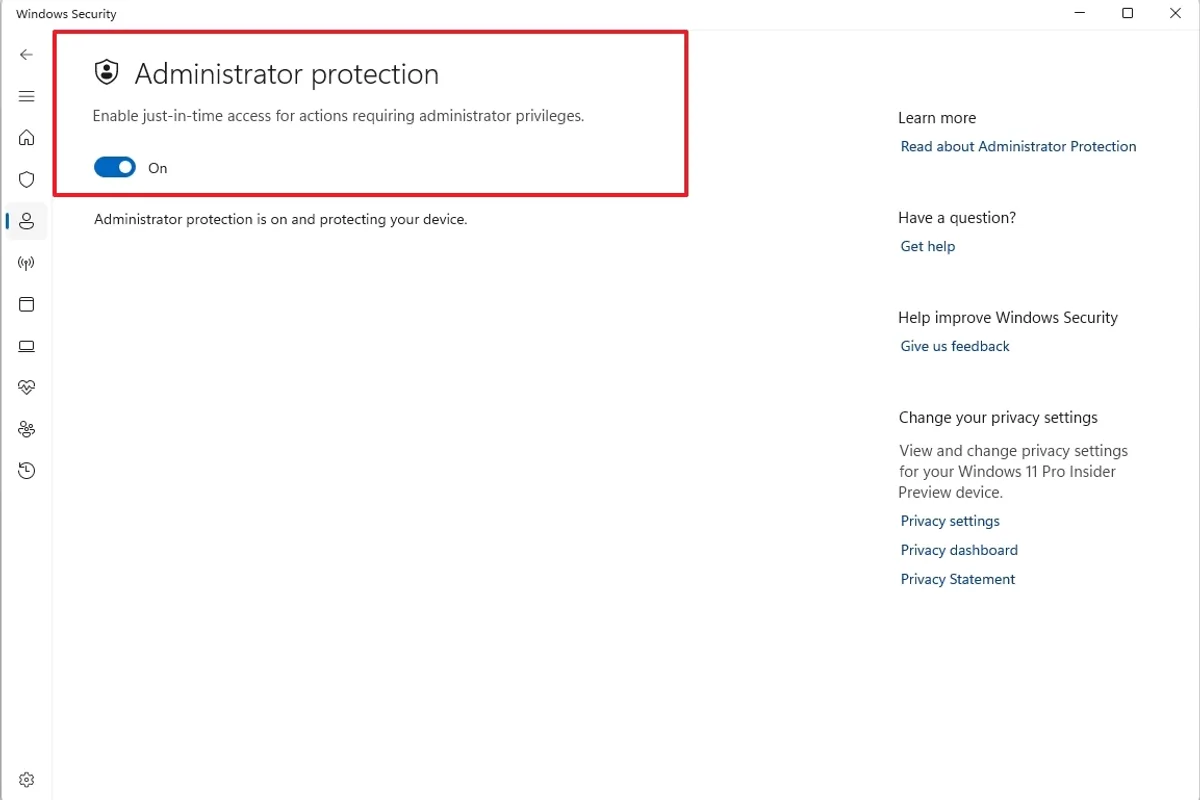
Administrator protection is intended to reduce reliance on persistent elevated privileges and provide additional control over operations requiring administrative access.
The feature itself predates this update, as IT administrators were already able to enable it through earlier mechanisms.
What is new in KB5127653 is the consumer-facing activation experience.
Microsoft says the control is rolling out gradually over the coming months. Its absence immediately after installation does not necessarily indicate an installation failure.
Precision touchpads gain additional scrolling options
Compatible precision touchpads are receiving two new gesture controls.
Single-finger scrolling allows vertical movement from the left or right edge of the touchpad.
Automatic scrolling allows users to continue moving through content by bringing their finger near the edge of the touchpad without lifting it.
The settings can be found under Bluetooth and devices, then Touchpad, when supported on the relevant hardware.
These options are part of the gradual rollout and should not be expected on every touchpad immediately.
Accessibility and keyboard controls also change
An accessibility option called Open apps maximized allows supported applications to open in a maximized state automatically.
The setting may be useful for people who rely on screen magnification, prefer a consistent workspace or want to reduce window-management steps.
The Windows Magnifier toolbar is also receiving refreshed icons and spacing without changing its established zoom and reading functions.
Microsoft is improving keyboard, gamepad and Narrator navigation in Bluetooth quick settings.
Another addition allows the Copilot key to be reassigned as Right Ctrl or the Context Menu key.
This option offers greater flexibility to users who prefer conventional shortcuts over a dedicated assistant button.
Recovery and enterprise management receive targeted updates
Windows Recovery Environment can now reuse certain Wi-Fi profiles that were previously saved in Windows.
That includes some certificate-based networks, potentially making network-dependent recovery operations more straightforward.
Microsoft also introduces a recovery remote-management extension for MDM providers.
Following a Windows settings restoration, a Restore Summary now provides information about recovered settings and Microsoft Store applications.
Several business-focused fixes address Remote Desktop, Always On VPN and BitLocker.
One Remote Desktop issue prevented non-administrator users from connecting to certain remote devices with Administrator protection enabled.
The VPN fix addresses connection failures that could follow the September security update, particularly when automatic protocol selection or fallback was configured.
BitLocker receives improved handling of pre-boot PIN retries to prevent accidental repeated submissions from triggering a TPM lockout.
Microsoft also fixes an issue affecting nested virtualization in WSL2 on some AMD-based systems.
Smaller changes include Emoji 17.0 and updated AI components
Windows 11 gains support for Emoji 17.0, with additional characters available through the emoji panel.
A new Tips widget provides short guidance on Windows features and can be added to the Widgets board or supported lock-screen configurations.
Microsoft is improving desktop wallpaper behavior, including slideshow reliability and support for DIB files as backgrounds.
The Installed apps page also displays packaged application version numbers more prominently.
Camera settings receive a reliability improvement for the option that allows multiple apps to access the camera simultaneously.
The update additionally refreshes image search, content extraction, semantic analysis and settings-related AI components to version 1.2610.1071.0.
Microsoft notes that these AI component updates apply to compatible Copilot+ PCs and do not install on every Windows machine.
Should users install this optional preview?
KB5127653 is intended for Windows 11 version 26H1. Systems running versions 25H2 or 26H2 receive separate update packages.
Eligible users can find the preview through Settings, Windows Update, Advanced options and Optional updates.
The Microsoft Update Catalog also provides packages for supported configurations.
Because this is a non-security preview, there is no universal need to install it immediately on every PC.
Users affected by the specific Bluetooth, HDMI, VPN or Remote Desktop problems addressed by the update may have a stronger reason to install it.
Those operating stable systems, especially computers used for critical professional workflows, may prefer to receive the fixes through a subsequent regular update.
The unresolved USB Audio Class 1.0 issue deserves particular attention for people using older or specialized audio equipment.
It is also important to remember that some interface features will roll out progressively and may not appear immediately after installation.
KB5127653 is ultimately a collection of reliability improvements rather than a major Windows redesign. Its value will depend on whether it addresses problems affecting a particular PC without introducing unacceptable compatibility risks.