
 By Camille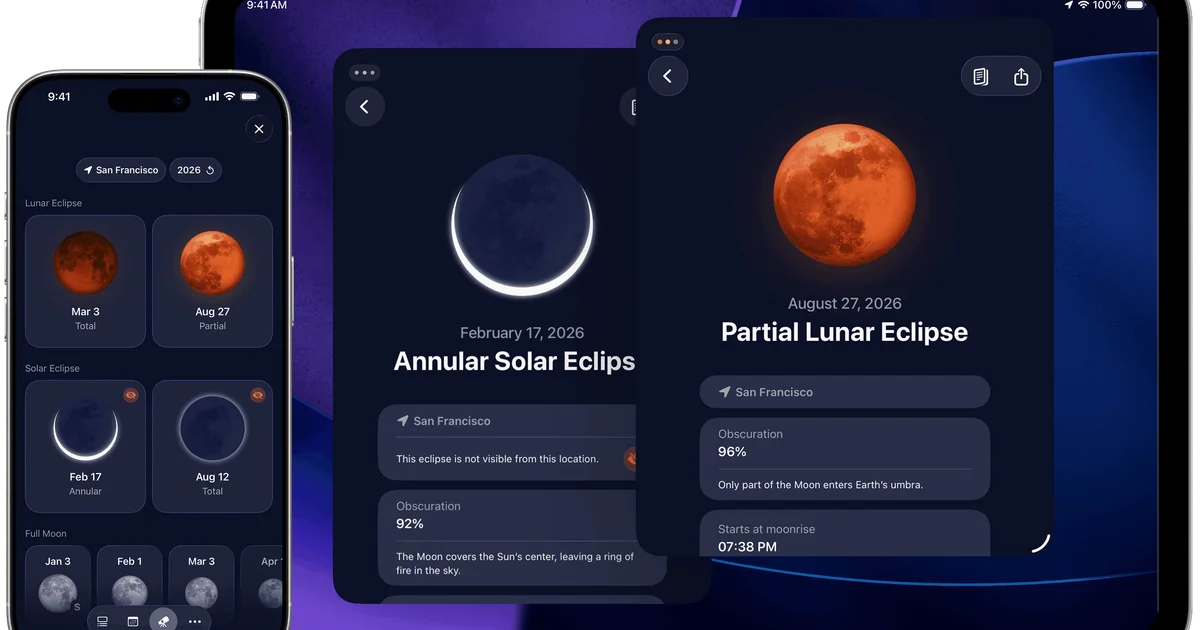
Every September brings new software releases, significant updates and promises of a better-organized digital life. Many of those apps are forgotten a few weeks after installation. The more useful approach is to look for software that solves a specific problem. On September 14, 2026, German Apple publication Mac Life published a selection of seven recommendations covering eight iPhone apps. The group includes astronomy tools, health-related software, a haptic relaxation app, a year-at-a-glance calendar and several travel planners. Some offer useful free functionality. Others depend on subscriptions or one-time purchases. There is also an important distinction concerning the source. This is an independent editorial selection, not Apple's official ranking of the month's best new apps. However, one of the featured products, Moonlitt, did receive an official Apple Design Award in 2026. That recognition makes it a natural place to begin.
Moonlitt makes lunar observation easier
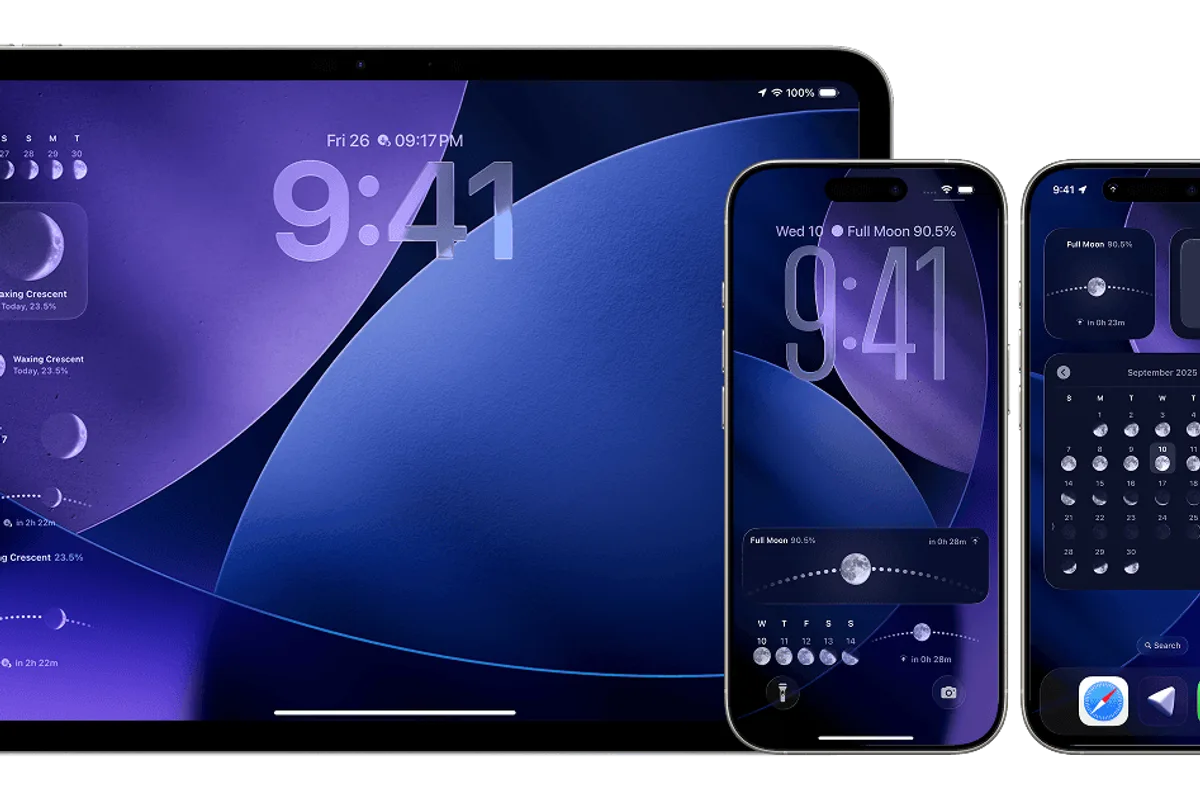
The moon is visible from much of the planet, but predicting its exact position is not always straightforward. Moonlitt attempts to make that information accessible without requiring specialist astronomical knowledge. Developed by Italian studio Flipping Hues, the app displays lunar phases, moonrise and moonset times, the moon's path and upcoming celestial events. An interactive calendar helps users plan observations. Visual tools explain where the moon will appear at a particular time. Augmented reality is especially useful for photography. A landscape photographer can prepare a composition while considering the direction and elevation of the moon. The app also includes eclipse information, notifications, widgets and Apple Watch features. Its audience extends beyond dedicated astronomy enthusiasts. Someone planning an occasional full moon photograph may find it useful. Others may simply enjoy understanding what they can see in the evening sky. In June 2026, Moonlitt won an Apple Design Award in the Interaction category. Apple recognized its interface design and its thoughtful adaptation to different devices. The September 2.9 update also brought deeper integration with Siri, Spotlight and widgets. The app can be downloaded for free, while expanded Pro functionality is available through paid options.
Sunlitt helps photographers find the right sunlight
Sunlitt comes from the same development team as Moonlitt. Instead of tracking the moon, it focuses on the sun. The app shows the sun's position, sunrise and sunset times and its path throughout the day. It highlights golden and blue hours, periods that are particularly useful for photography. Low sunlight creates different colors and shadows from the harsh light often found around midday. Sunlitt helps photographers anticipate those conditions. It also includes tools for understanding shadows. Users can examine how buildings, terrain and obstacles affect sunlight in a particular location. That may be useful when planning photographs, evaluating a terrace or considering the natural light around a building. Many of its astronomical calculations can work offline, according to the developer. Sunlitt was an Apple Design Award finalist in 2024. Together, the two apps present complex information through carefully designed interfaces. Mac Life reported a combined Sunlitt and Moonlitt subscription priced at €5.99 per month or €29.99 per year in September. Those prices should be checked in the App Store before subscribing. For photographers who regularly plan around natural light, the combination may be worthwhile. For someone who only wants to know when the sun sets, a conventional weather app may be sufficient.
Node Health organizes blood test results
Medical laboratory reports often contain large numbers of measurements. Comparing results collected months or years apart can be awkward, especially when they arrive as separate documents. Node Health is designed to organize that information. Users can import PDF reports, scan documents or manually enter selected values. The app displays trends using graphs and other visual tools. Mac Life describes support for more than 230 markers, including a range of biological measurements. That could be helpful for someone who wants a clear history to discuss during a medical appointment. However, the interpretation of laboratory results requires care. Reference ranges vary with context and measurement methods. An unusual result is not automatically evidence of a medical condition. Software can display patterns without establishing their clinical meaning. Privacy is also a major consideration. Medical reports contain sensitive personal information. According to Mac Life, some values remain stored locally, while AI-assisted scanning may involve sending documents for remote processing. Users should therefore examine the privacy settings and data-handling terms before importing reports. Node Health may be useful for organizing records. It does not replace a healthcare professional's interpretation of those records.
Vän turns iPhone vibrations into a relaxation tool
Many relaxation apps rely on audio, videos or long guided sessions. Vän takes a more unusual approach. It uses the iPhone's haptic engine to generate patterns of vibration intended to accompany quiet moments. Developed by Adrian Gabor Stanco, the app provides different tactile experiences. Mac Life describes nine patterns, along with guided breathing rhythms and a sleep timer. The concept is appealing because it does not necessarily require users to keep looking at the display. Someone can follow a breathing rhythm through physical feedback. That offers a different experience from watching an animated circle on a screen. However, preferences will vary. Some people may find gentle vibrations pleasant. Others may prefer silence. The app should not be presented as a medical treatment for anxiety or sleep disorders. Its purpose is relaxation and general well-being. Its most interesting contribution may be demonstrating that a smartphone can support a calmer activity without demanding constant visual attention.
Yearli puts an entire year on one screen
Calendar applications typically focus on the next appointment, the coming week or the current month. Yearli takes a broader approach. Previously known as Yearo, the app presents events across an entire year. The aim is to make busy periods, gaps and longer-term patterns more visible. That can help people planning vacations, work commitments or activities several months in advance. Yearli supports calendars from Apple and Google. Events can be combined into customizable views. The app also offers filtering and export options, including PDF and image formats. Mac Life highlights its ability to create numerous views and display many calendars. That level of flexibility may benefit users managing several schedules. For someone with only a handful of weekly appointments, it may be unnecessary. Calendar permissions deserve attention as well. An application with access to several calendars may see personal appointments, travel plans and information about other people. Users should understand how those details are accessed and synchronized before connecting their primary accounts.
Wanderlog brings a whole trip into one itinerary
Planning a trip can involve several disconnected sources of information. Hotel reservations arrive by email. Transport tickets live in another app. Restaurants are saved on a map. The group's itinerary may exist in multiple message threads. Wanderlog attempts to bring everything together. Users can create day-by-day plans with places, activities and reservation details. Destinations appear on a map. Stops can be rearranged, and distances between locations can be examined. Collaboration is a major part of the experience. Multiple travelers can contribute to an itinerary and adjust shared plans. The app also supports budget organization and expense tracking. For a group preparing a complicated holiday, those features may be particularly valuable. However, some advanced tools depend on Wanderlog Pro. Mac Life reported a €36.99 annual subscription in September for additional capabilities. Current pricing and features should be verified before purchasing. Wanderlog is most convincing when a trip involves many stops, bookings and participants. For a simple weekend getaway, a calendar and a map may still be enough.

Trovelo is a more private Apple-focused travel planner
Trovelo addresses a similar planning problem but emphasizes a different experience. Instead of focusing primarily on large collaborative itineraries, it helps individuals organize trip details through structured cards. Those cards can represent places, restaurants, accommodation, routes and other activities. They may include notes, photos, times and expenses. One of the app's principal selling points is data management. According to the description reported by Mac Life, Trovelo does not require a separate proprietary account. Trip information is synchronized using the user's iCloud environment. For people who primarily use Apple devices, that may be an appealing arrangement. The app also offers certain features built around Apple Intelligence. Users can describe a planned activity in natural language and have the software prepare an itinerary entry. That functionality requires compatible hardware and software. It should not be assumed to work on every iPhone. Trovelo also has limitations. Mac Life noted that its interface was in English and that shared plans were primarily read-only. For groups needing extensive real-time collaboration, Wanderlog offers a stronger fit. For individuals who want a personal Apple-based travel organizer, Trovelo may be more appealing. The September article reported a €7.99 one-time Pro unlock rather than an ongoing subscription.
Atlas Obscura helps travelers discover unusual places
The final app approaches travel from a different direction. Rather than focusing on how to organize an itinerary, Atlas Obscura helps users decide what might be worth seeing. The project began as a website documenting unusual destinations and stories from around the world. Its iPhone app brings those discoveries onto an interactive map. Users can explore natural curiosities, remarkable buildings, unusual museums and lesser-known historical locations. Individual entries provide background information and practical details. Places can be saved to personal lists. Users can also keep track of destinations they have already visited. That makes the app useful even in cities people believe they know well. Major attractions are easy to find through conventional travel search tools. Smaller and more unusual places may require additional exploration. Atlas Obscura aims to make that discovery easier. Mac Life described the app as free, while noting that it could feel less responsive than the website. There is also a practical limitation. A listed destination may be temporarily closed, privately owned or subject to access restrictions. Opening hours and local conditions should be verified before visiting.
Which app should you actually download?
This selection does not work particularly well as a strict ranking. Moonlitt and Sunlitt are aimed at people interested in astronomy, photography and natural light. Moonlitt's Apple Design Award gives it especially strong recognition for interface quality. Node Health may help people organize medical records, but it requires caution around privacy and clinical interpretation. Vän offers an unusual tactile approach to relaxation. Yearli makes more sense for people who plan across several months or manage multiple calendars. The three travel apps complement one another. Wanderlog is particularly useful for collaboration and complicated itineraries. Trovelo emphasizes personal planning and Apple's own ecosystem. Atlas Obscura is more about discovering interesting destinations than managing bookings. There is little benefit in installing every app simply because it appears in a monthly selection. The appropriate choice depends on a recurring need. A tool designed for a specific habit can provide more value than a highly sophisticated app that rarely gets opened.
Independent developers still offer some of the App Store's best ideas
September's selection highlights an appealing side of the Apple software ecosystem. Interesting applications do not have to come from the largest technology companies. Flipping Hues uses Apple's interface technologies to make astronomy accessible. Yearli rethinks the traditional calendar view. Vän explores the haptic capabilities of the iPhone. Trovelo offers an alternative approach to travel organization and purchasing. The common thread is specialization. Each app has a relatively clear purpose rather than attempting to provide every imaginable feature. That does not eliminate the need for basic checks. Subscriptions should be reviewed carefully. Permissions and data handling matter, particularly for health and calendar applications. AI-based features may require compatible devices. And prices recorded in September may not remain unchanged. This article is based on Mac Life's September 14 editorial selection and the corresponding official App Store listings. It should not be confused with an official Apple ranking of every new app released during the month. The most practical approach is to choose one app that addresses a real problem, explore its free functionality where available and decide whether its paid features justify the cost. A genuinely good App Store discovery is not the one that looks most exciting on the day it is downloaded. It is the one that remains useful after the novelty has worn off.